How the Bushnell Golf LPi Can ImproveYour Indoor Golf Practice

Practicing golf indoors can be frustrating without proper feedback. The Bushnell Golf LPi Personal Launch Monitor makes it easy by providing accurate data on every shot, helping you improve your swing and make indoor practice effective.
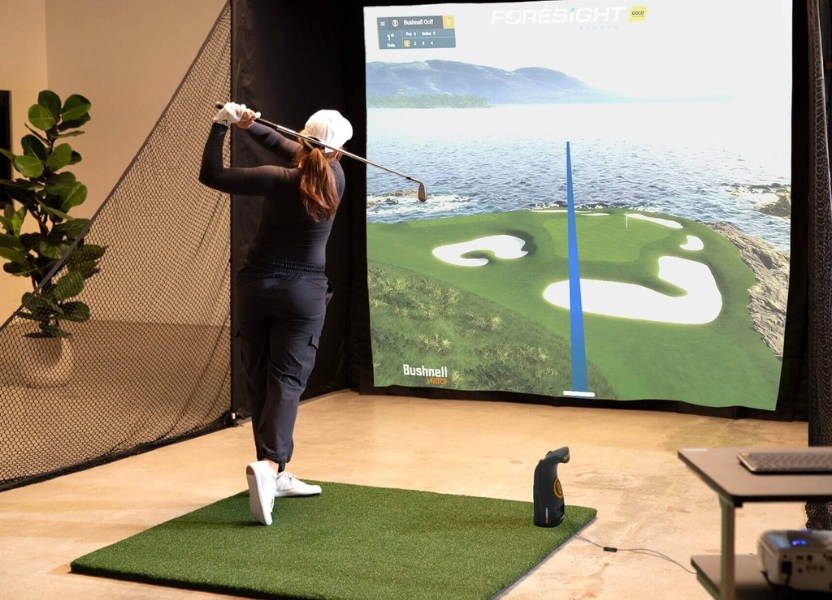
Indoor golf practice is often limited by the number of tools. You might hit hundreds of balls but not know if your swing, distance, or spin is consistent. This can make practice feel slow and frustrating because you’re guessing rather than learning from data. The Bushnell LPi helps solve that problem. It shows you detailed information about your shots and club performance, so you can practice smarter. You’ll see everything from ball speed and spin to carry distance and launch angle.
What Is the Bushnell LPi?
The Bushnell Golf LPi is a small device called a photometric launch monitor. It uses cameras to track your ball and club during indoor swings. This makes it perfect for home simulator setups or anyone who wants accurate practice data. It is not meant for casual outdoor driving range sessions. The LPi is great for serious amateur golfers, golf simulator fans, and coaches who want detailed feedback. If you want to see exactly how your swing affects ball flight, the LPi is made for you.
Key Features Every Golfer Should Know About the LPi
The LPi has several features that make it a powerful tool for indoor golf practice. It provides detailed data, works with simulators, and is easy to use once set up.
Data and Performance Metrics
The LPi tracks important information about each shot. You get ball speed, launch angle, spin rate, carry distance, and sometimes club data like club head speed. These numbers tell you how well you’re hitting the ball and where improvements can be made. For example, if your ball is spinning too much, you’ll see it immediately and can adjust your swing.
Photometric Camera Technology
The LPi uses high-speed cameras to track the ball and club at impact. This makes it more accurate than radar-based monitors in indoor spaces. Even in a small room, the LPi can measure your shots reliably. This technology ensures your practice is based on real numbers, not guesswork.
Simulator Compatibility
The LPi works with popular golf simulator software like FSX Play and GSPro. You can play virtual courses, practice shots, or challenge yourself with games. Some software may require a subscription, but it adds an interactive element to practice. This makes indoor training feel closer to playing on a real course.

Everything You Need to Know About Installing the LPi
Setting up the LPi is simple if you know what to consider. Proper space, hardware, and calibration are important to get accurate readings.
Space Requirements
You need a room with enough depth for a full swing and enough ceiling height to avoid hitting anything. A clear hitting zone is important so the LPi can track every shot without interference.
Hardware Requirements
The LPi needs a computer to run the simulator software. Make sure you have enough power and stable connectivity. A proper setup ensures the monitor can send data to your screen in real time without delays.
Ease of Setup
Bushnell designed the LPi to be beginner-friendly. Calibration is easy, and once the device is set up, you can start practicing immediately. With simple steps, anyone can get it running and start seeing detailed data of every swing.
The Bushnell Golf LPi Personal Launch Monitor makes indoor golf practice smarter by giving accurate ball and club data, working with simulator software, and being easy to set up. It’s perfect for serious golfers and coaches, helping make every practice session more effective and focused. With its precise tracking, you can identify strengths or weaknesses in your swing quickly. So, turn your indoor practice into a more engaging and enjoyable experience with Bushnell Golf.
Stay tuned to RuggedOutfits to explore more about Bushnell Golf.
Recent Blogs
-

Does Rugiet Go Long Really Work and What Can You Realistically Expect
-

Fairmont Guide: Choosing the Right Luxury Hotel Stay
-

Affiliate Store Review: Finding the Right Parenting Products Online
-
Best Electric Scooter for Adults by VORO MOTORS Who Want Fast Transportation
-
Best Bikes for Sale in 2024: Top Picks from Mike's Bikes